


What is a product feed? A product feed, also known as a product data feed or shopping feed, is a structured file containing key details about your products, such as title, price, availability, and more. It powers your ability to display and advertise products across platforms like Google, Meta, Pinterest, and other digital advertising channels. Soon, you’ll even be able to upload your product feed to improve product discovery on ChatGPT.
If you’re using digital advertising to promote your e-commerce store, having a high-quality and regularly updated product feed is essential. It directly impacts how your products appear in ads, how often they show, and how much you pay per click—all of which influence performance.
At ROI Revolution, we’ve optimized hundreds of feeds for brands across verticals. Here are five of the most common (and costly) product feed mistakes we see, and how you can avoid them.
Mistake #1: Inconsistent or Incorrect Pricing
When the sale price shown in your ad doesn’t match what’s on your landing page, your products can be disapproved, and your account can be suspended for policy violations.
This is most often an issue when using strikethrough pricing like: $190 $95, and only one of these prices is submitted in your feed.
How to Avoid Incorrect Pricing Errors
- When running sales or promotions, include both price (original) and sale_price (discounted) in the feed.
- Reinforce price data and other pertinent information with structured data (Schema markup) on your product pages.
- Use the sale_price_effective_date attribute for time-sensitive sales.
- Automate the transition between prices with feed management tools or rules.
- Utilize automatic item updates in platforms like Google and Meta to help keep products approved and active if there are any discrepancies between the pricing in your feed and your website.
Mistake #2: Missing or Non-Optimized Product Titles
Product titles are one of the most important elements of your product feed. Titles should be descriptive and unique, including important information such as size, color, brand, gender, material, or other relevant details to help shopping platforms surface your products to your target audience.
Weak titles can lower click-through rates and relevance signals, impacting overall product visibility in shopping engines.
How to Avoid Vague Product Titles
If you’re not a creative writer for a living, don’t sweat it! You can easily avoid generic titles using a consistent format like [Gender] + [Brand] + [Product Type] + [ Product Specifications / Variant Details], which could look like this: Women’s Cozy Earth Bamboo Rib-Knit Sleep Dress – Navy, Size Large
Pro tip: Keep the most important information within the first 70 characters or less of your product titles to avoid truncation in Google Shopping ads, especially on mobile devices. Any additional information can be included after the 70-character mark but should not exceed Google’s 150-character limit.
Mistake #3: Incorrect or Missing GTINs/MPNs
Google and other platforms rely on unique product identifiers, like GTINs (Global Trade Item Numbers) or MPNs (Manufacturer Part Numbers), to group products, compare pricing, and show relevant results. Missing or incorrect values can hurt your visibility and, in some cases, lead to disapproval.
How to Avoid Incorrect GTINs in Your Product Feed
1. Check if your products require GTINs (branded products almost always do).
2. Use manufacturer data or barcode scanning to source GTINs accurately.
3. If you’re using Google Merchant Center, set up attribute rules to map in missing GTINs (and other data) with supplemental feeds.
Pro tip: If this feels too technical, you’re not alone. Our Feed experts can help!
Mistake #4: Low-Quality Imagery
It should be no surprise that using non-optimized imagery (fuzzy, blurry, or pixelated images, watermarked images, or those that are too small or the wrong aspect ratio) can cause problems in your product feed.
It’s well-known that consumers shop with their eyes, so having great imagery is an important aspect of your product feed.

How to Avoid Image Issues
Some platforms will disapprove images with logos, borders, or promotional text on them, so make sure your imagery is clear and without any extra info. The same is true for images that are too small (or even too big) and don’t meet the platform’s minimum requirements.
For the best results, use high-resolution images on white backgrounds and ensure the image URL in your feed is crawlable and not blocked via a “nofollow” tag or robots.txt file.
If you’re advertising your products on Google, you can use the Product Studio tool within the Merchant Center to increase image resolution, remove busy backgrounds or text overlays, and even generate lifestyle images. The images you modify can then be downloaded and used across other platforms or even your own website.
Pro tip: As each platform allows, add additional images that show the product in use and/or from different angles to give your feed a leg up on competitors. In 2022, Search Engine Land reported that only 25% of online merchants were providing additional imagery.
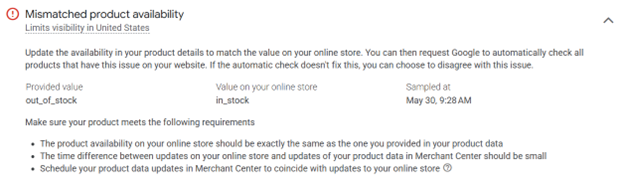
Mistake #5: Inventory Mismatches
When your feed says something’s in stock, but your landing page says otherwise, that creates a poor user experience and can result in account penalties or suspensions.
How to Avoid Availability Issues
There are three primary ways to avoid this issue:
1. Set up alerts for stock discrepancies.
2. Use the “availability” attribute to specify in stock, out of stock, preorder, and backorder. 3. Connect your CMS or e-commerce platform with your feed to automate inventory syncing
Bonus Tip: Use a Supplemental Feed to Fill Gaps Fast
If you’re dealing with missing or incorrect product data and can’t easily update your e-commerce platform, a supplemental feed can save the day. This secondary feed allows you to patch in missing GTINs, update sale prices, or correct formatting issues without touching your main product database. You can even use it to test optimizations like new title formats or seasonal imagery.
Set Your Feed Up for Success
Your product feed is more than a data file; it’s the foundation of your e-commerce advertising. Taking the time to optimize your feed can pay off with increased visibility, lower CPCs, and higher conversions. Whether you’re building your first feed or cleaning up a messy one, make sure you’re avoiding these common mistakes.
Need help troubleshooting or upgrading your feed strategy? Our team has the tools and expertise to help you turn your product feed into a performance driver.