

If you’ve ever wondered “how can I make my dollars go further with my Pmax campaigns?” or “what can I even do to my data feed to make it ‘better’?”, then let us point you to a newly available report that Google can provide called Merchant Excellence. Being successful on Google Shopping/Pmax is dependent on more than just connecting your ecomm platform to Google, throwing items into a campaign, and setting a target; it’s about making sure that you’re getting the right product in front of the right customer, at the right time – a lot of which is done via a healthy product feed and Merchant Center management process.
What is Merchant Excellence?
Your Google Merchant Excellence Score (MerchX) is comprised of dozens of weighted criteria and metrics. MerchX benchmarks your merchant score against top competitors in your region, and the scores range from 0-100, with “excellent” scores being above benchmark. The benchmark score provided will depend on the category and channels you provide data for.
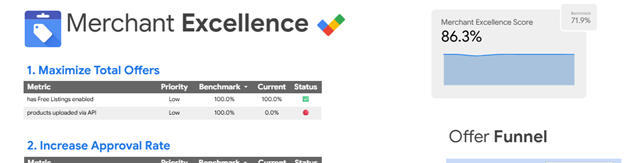
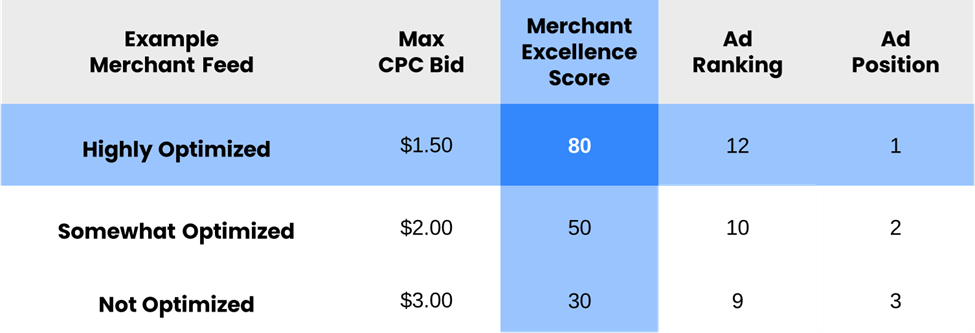
With a higher MerchX Score, you’ll consistently drive stronger ad positions, better CTR, and pay lower CPCs than those with a lower score and poorer feed quality.
You can view an example Merchant Excellence report HERE. The report is broken down into a few sections – the assessment/score, information about the annotations, highest priority specific action items to tackle, and some definitions to help better understand each of the metrics.
To help better understand MerchX and how you can improve your Google official Merchant Excellence rating, we’re kicking off a series called Merchant Excellence Mondays that will dive deeper into the report, the most important criteria of the scoring system, and best practices on how to improve them.
Product Titles & Descriptions
The product title does a major amount of heavy lifting regarding search query relevance and is one of the core points that Google’s algorithm uses to make products show up for what shoppers are searching for. Aside from the product image itself, the title is the most prominently featured facet of your listing.
Descriptions, like titles, are important to increase the chances of matching the items you’re offering to the searches shoppers are conducting. A more detailed description tends to increase impressions for your product and you have tons of room to add important terms and keywords here!
In the next Merchant Excellence Monday article, we’ll cover our proven best practices for each of these attributes, highlight some wins, and showcase a few examples. You can look forward to that article coming in 2 weeks.
Product Listing Annotations
Those little badges and callouts you see on product listings that convey info like “price drop”, “Sale”, “Free Shipping”, and more – they are more than just visual cues to customers that your items are discounted, they play a key role in enhancing your Merchant Excellence rating in Google’s scoring system too!
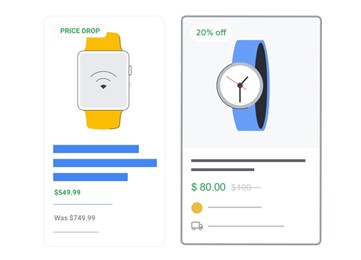
What are the most valuable annotations and how can you leverage them? Find out in our upcoming article on February 16!
Images & Visuals
Having an interesting and eye-catching primary product image is crucial to draw attention to your listings. Making sure the main image is high quality and meets specifications is important, but what may even be more important is the number of images that you can provide. Image quality can be make-or-break for your Merchant Excellence rating and initial shopper engagement and passing multiple, high-quality images can help you improve your score and represent your brand and items better visually to shoppers.
We’ll cover more information about images and additional images in early March, so check that one out when it drops!
Breadth and Depth of Key Item Information
Sticking to just providing Google the basics will never be enough to truly excel on Google Shopping and Pmax. The bare minimum to get items eligible may be the simplest option and less time/resource allocation, but passing as much accurate, healthy data about each item is what will help you exceed the benchmark scores and outshine competitors.
While many of the attributes that can be submitted in a Google feed are considered “recommended” or just “optional”, we’ve seen time and time again that providing Google with an abundance of information pays its dividends.
You can learn more about optional/secondary attributes and rich data attributes in an upcoming article in March.
Understanding the Offer Funnel
Do you know which of your products are even eligible to be advertised in Shopping/Pmax campaigns? Which products are approved vs disapproved? What about products that receive no impressions or clicks but are eligible to be advertised? Understanding where specific drop-offs occur is the first step in figuring out what’s going wrong and why potential sales for important items are slipping through the cracks.
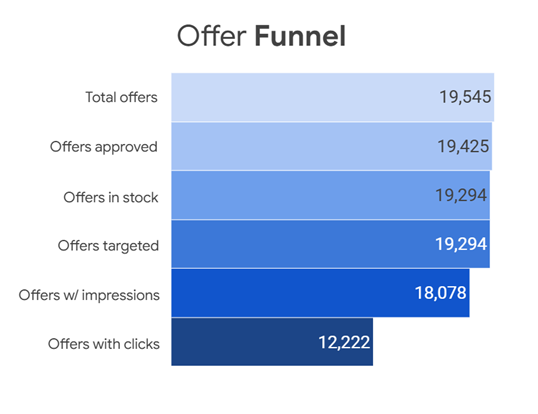
Later in the quarter, you can read more about our findings and best ways to interpret and analyze the Offer Funnel flow chart in the Merchant Excellence report, and even if you don’t have a Merchant Excellence report to review, we want to help you understand how to address where there are gaps in products submitted all the way down to products purchased.
There will be plenty of other Merchant Excellence Monday articles sprinkled in throughout the quarter outside of these 5 core components, so be on the lookout for those as the weeks go on.
ICYMI
Check out our other recent Feeds articles here: