


Have you ever searched for your products on Google and been disappointed when you can’t find them in any Shopping ads? It’s possible that your titles and descriptions are the reasons!
The Merchant Excellence rating system classifies title and description optimizations as a way to “lead to significant performance improvement due to the importance of the attribute”. While the MerchX rating criteria are primarily based on character count, we know that title and description optimizations are two of the most impactful updates you can make in your product feed, especially with an intentional focus on keyword insertion.
Aside from the image, titles are the first impression you’ll make with potential customers; they’re what directly influences which products show to those customers and should accurately reflect what your product is. They should also highlight the unique selling points that encourage searchers to click through to your site. Enriching your feed titles and descriptions with relevant keywords can greatly increase your chances of showing in Shopping ads and getting the chance to make a first impression with potential customers. But how do you optimize the content in your product feed?
Keep It Simple
Google’s recommendation for titles is a bit formulaic:
Brand/Manufacturer (if relevant) + Product Type (what is it?) + Attributes (keywords)
So, a basic title might look like this:
Acme Shoes – Blue
This is a good start, but it’s less than 20 characters and Google allows up to 150 characters to describe your products, so why not include more information?
Acme Men’s SkyShoe Flight | Lightweight Running Shoes | Royal Blue / Navy / White | Size 9 | Regular Fit & Lace Closure
The first 25-30 characters of your product title is the most important to Google. Listings/ad units will often show the first 60-70 characters within the listing and only the first 15-20 without hovering over the product listing itself, so it makes sense to front-load the most relevant terms.
Our optimized title is now around 120 characters; our most-relevant terms are in the first 60 characters, and we have added several relevant keywords that can match shopping search queries and bring people to your site!
Here’s an example of simple vs optimized titles in the wild.
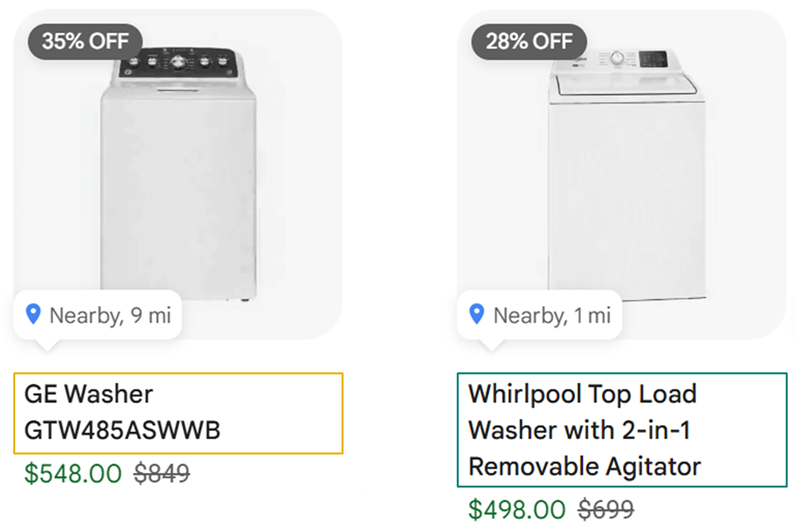
The title for the washer on the left is short and provides little-to-no information about the product, and even less words to match search queries, but the washer on the right is a robust title with several details and keywords that could easily match to how shoppers search for the items.
It’s best to add specific and relevant terms that shoppers are actually using to search for your product or similar products. Avoid using any gimmicky words like “sale”, “free shipping”, “best”, or “new”, etc. and don’t include any words in all caps. In general, you want to avoid using any terms that could lead to rejections/disapprovals. You’ll want to make sure that you read Google’s Shopping ads Policies to make sure that you’re not using any words or phrases that could lead to product disapprovals, even if the terms are relevant for your products.
Descriptions have a 5000-character limit, and we generally recommend including your optimized title in your description and then using the description located on your product page plus any keywords that won’t fit naturally in your title.
Keep it Consistent
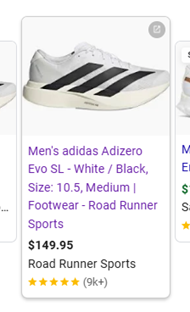
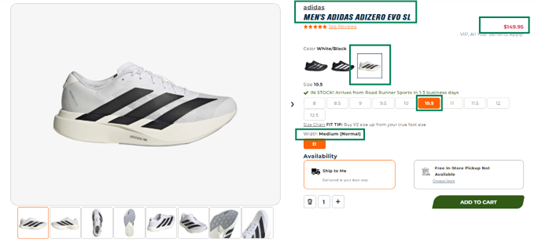
Make sure that the title accurately describes the product that’s shown when a shopper lands on the product page. Don’t call out details that aren’t clearly stated on the landing page to avoid any confusion.
For example, if material or specific uses aren’t included somewhere on your product page, you may not want to include those details in your titles or descriptions. This can help users to trust the shopping listing and prevent a site bounce because they can’t find what was called out in the ad.
Note that if you have multiple variants on your product page (color, size, etc.), Google’s best practice is to make sure the link in the feed will preselect the correct/matching variant when the PDP loads.
Use AI Carefully (if at all)
You may be tempted to use AI to generate your titles and completely handle any description optimizations/enhancements. While this may be a good way to generate ideas, using raw AI-generated titles is not a proven best practice. If you want to include AI titles in your feed, Google has specific feed attributes for doing so. When including AI-generated titles and descriptions, Google suggests passing this content in [structured_title] or [structured_description] instead of the [title] and [description] attributes if you want to test using them.
While we don’t promote utilizing AI to fully control the generation of your optimized titles, we understand the evolving Search and Shopping landscape. There are intentional updates that you can make to your content to surface more often in AI Mode or AI Overviews, similar to how GEO is more of a focus in the organic realm. We suggest that you can do this by using AI tools to:
- Assist with brainstorming keywords and terms
- Identifying common search queries
- Generate initial drafts of titles and/or descriptions to match how users conduct searching on AI platforms versus standard search engines
- AI tools can help speed up the creative process and surface ideas you might not have considered but it’s important to treat AI as a collaborator, not a decision-maker
- Always review and refine AI-generated content to ensure it aligns with your brand voice and adheres to Google’s policies
As we mentioned above, title and description optimizations are the most impactful update you make to your product feed and critical for improving your Merchant Excellence score. In A/B tests that we have run over the last four years at our agency, we have seen more than a 20% increase in clicks due to title and description updates we’ve made for our clients. Try out your own A/B title test for your top products – and you might be surprised by the difference in traffic!
Remember to keep it simple, keep it consistent, and use AI carefully when approaching optimizations for these attributes. If you have the time and resources, or the right partner to help, optimizing these two attributes is the easiest way to see a boost in traffic, improve CTR and CPCs, and enhance your MerchX score.
ICYMI
Check out our other recent Feeds articles here: