

The Holiday shopping period from – Black Friday through Cyber Monday and the surrounding weeks – are a make-or-break time for e-commerce businesses. To capitalize on the surge in traffic and purchase intent, your product listings from Performance Max and Shopping campaign placements must be flawless.
The foundation of this success lies within your product feed and Google Merchant Center. A poorly managed feed, widespread product disapprovals, or an untimely account suspension can derail your efforts and cripple your sales potential.
Drawing on more than 13 years of experience, we’ve identified three pillars of feed management for Cyber Week readiness: Feed Accuracy, Data Depth, and Feed Quality. Intentionally focusing on these areas will ensure your campaigns run smoothly and effectively during the most critical sales period of the year.
Pillar 1: Ensure Feed Freshness and Accuracy
Wasting advertising spend during peak season is frustrating, but spending it on products customers can’t buy is even worse. Ensure that your product data, especially [price], [sale_price], [availability], shipping, and return information, is consistent and accurate across all your ad platforms, including Google and Microsoft Merchant Centers, and Meta Commerce Manager.
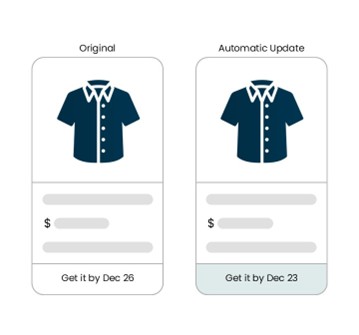
Pro Tip: Google’s new, automated way to allow for shipping times and estimates to be shown is called “Automatic Shipping Updates,” but use it with caution and ensure accuracy even after it’s enabled to prevent incorrect shipping timelines or cost from showing to shoppers!
Accuracy also extends to technical details. Correct GTINs (UPCs), valid landing page links, and working image links are essential for keeping your products approved and eligible to serve. Providing Google with incorrect data about your product’s UPCs or a broken landing page can lead to unnecessary headaches and larger issues.
Accuracy and freshness also apply to promotions. Merchant promotions allow you to showcase your special offers across different Google surfaces. Adding promotions makes your listings more enticing to the shopper and increases click-through rate and conversion rate.
Important Actions:
- Sync Your Updates: Align your feed refreshes with on-site price and availability changes. If this means running your feed multiple times a day, the investment is worthwhile. Accurate data reduces customer friction and leads to more conversions.
- Perfect Your Promotions: Customer-facing promotions are crucial during this period to differentiate your offering and drive customer interest in your products.
- Submit Early: If possible, submit promotions in Merchant Center at least 72 hours before they go live. The high volume of promotions that Google must crawl during Cyber Week can lead to approval delays.
- Check Time Zones: Double-check that your promotion’s start and end times match your website and account time zone settings. A mismatch can cause a promotion to be rejected before it even goes live.
- Use Promotion Feeds: For greater control, use a promotion feed. This allows you to set a “promotion effective date” (when it’s valid) separate from the “promotion display date” (when it starts showing to users), giving you more flexibility.
Pillar 2: Maximize Data Breadth and Depth
Breadth: Include Your Entire Catalog → Barring strategic exclusions, your feed should contain all products available on your site. Instead of removing items that are not in stock, use the [availability] attribute to clearly mark their status as ‘out of stock,’ ‘preorder,’ or ‘backorder.’ This maximizes your catalog’s visibility for future opportunities.
Depth: Go Beyond the Basics → Go beyond the required attributes. Providing rich, detailed product data helps Google’s algorithm match your products to the right customer queries. This enhances performance and differentiates you from competitors.
Consider including these valuable optional attributes:
- [size], [color], [material] for non-Apparel items
- [google_product_category]
- [product_detail] & [product_highlight]
- Additional images, video links, and 3D model links
- [age_group], [gender], [pattern]
- [item_group_id]
- [short_title]
Pro Tip: Consider leveraging optional attributes for destinations outside of Shopping listings but also play into Google’s algorithm for matching your products to shopper’s searches. Also, consider utilizing attributes meant for Display Ads and/or non-standard Shopping listing destinations too (like [short_title], [display_ads_similar_id], and more) since Pmax campaigns can serve your products/information in multiple different surfaces.
Pillar 3: Enhance Feed & Merchant Center Quality
Enhancing your feed quality and leveraging Merchant Center features can help your products stand apart from the rest, appear for the right customer search queries at the right time, and each of the components below plays a critical role in influencing shoppers’ decision management and helping attract the best customers most ready to buy.
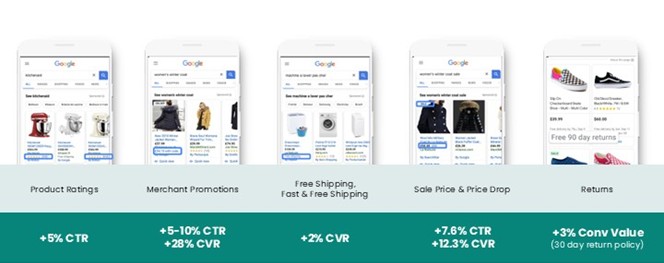
Leveling up your Merchant Excellence with annotations, with the most common being based on the following:
- Leverage Merchant Promotions to entice customers to click, to differentiate your offerings, and stand out from the competition
- Shipping & Returns Information
- Free Shipping is almost a must-have nowadays
- Speedy, 1–2-day delivery times (so handling time plus transit time) can also lead to a valuable annotation being delivered
- Ratings & Reviews
- Almost nothing promotes trust and provides social proof more than a high number of positive ratings/reviews!
- Make sure your ratings and reviews information are integrated with the Google Merchant Center in some capacity prior to Cyber Week!
- Price Drops and Sale Pricing
- Make sure to pass the appropriate attributes to have annotations triggered for when prices are decreased above a certain percentage or a product goes on sale
- Enhance your titles and descriptions:
- Insert highly relevant terminology into your [title] value – the [title] is the most important attribute in the feed for matching to shoppers’ search queries
- The first 35 characters of the [title] are the most important, but you have 150 total characters to play with…so use it!
- Avoid using any gimmicky or promotional language – this leads to editorial issues and product disapprovals
- Use keyword-rich phrases and text in your [description] values to help shoppers understand more about the items, as well as provide Google more “relevance” matching opportunities
- You’re allowed to use up to 5,000 characters in your [description] attribute, and Google also allows HTML formatting to create more aesthetically pleasing description information in the Google Shopping tab
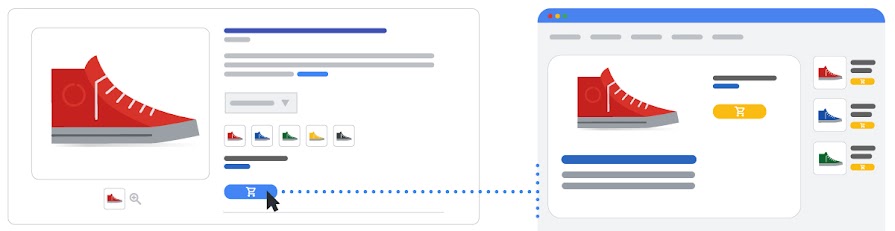
- Provide multiple high-quality images
- Showcase the specific product variant in the image
- Remove any overlays or text
- Include only high-resolution images
- Submit, if possible, 3-10 additional images per item
Be sure to keep all of these in mind as your thinking about how to get the most out of your Pmax and Shopping campaigns this Holiday season. Adequately prepping your product feed and Merchant Center and going above and beyond to optimize the data and ensure freshness and accuracy is paramount to having a smooth and successful Cyber Week and beyond!
Looking Ahead: Stay tuned for our Merchant Excellence Monday series, launching in 2026. We will dive deeper into each of these topics, and more, to help you master your Google Merchant Excellence rating.