

As more merchants enter the Shopping auction each year, simply passing accurate product data is no longer enough to stand out. Competition has intensified across both paid and organic placements, and shoppers are evaluating value before they ever click through to your site. That’s where annotations come in.
According to Google’s Merchant Excellence documentation, “activating annotations to influence decision making” is the 2nd most important initiative a merchant should tackle, even ranking ahead of title/description enhancements, image updates, or even categorization.
Appearing on both Shopping ads and Free listings through Google Merchant Center, annotations help surface key details like discounts, shipping benefits, and ratings directly on the listing. These enhancements can influence click-through rate, improve traffic quality, and strengthen overall feed competitiveness.
Google continues to test and evolve annotation formats, but several core enhancements consistently impact performance. Understanding how they work, and how your feed data supports them, is essential for driving stronger Shopping results.
Price Based Annotations
Price remains one of the most visible and most scrutinized elements in the Shopping auction. With multiple merchants appearing side by side in the same results, shoppers can compare pricing instantly. But competitiveness alone isn’t always enough. Shoppers aren’t just looking for the lowest number: they’re looking for confirmation that they’re getting a deal.
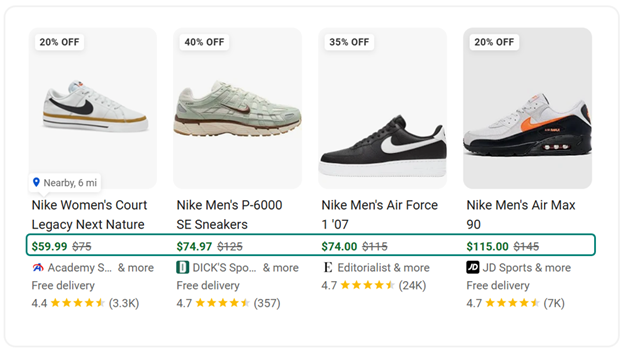
Sale Price
The Sale Price annotation appears when both a regular price and a discounted price are passed correctly in your feed.
To be eligible:
- Your standard price must be submitted using the [price] attribute.
- Your discounted price must be submitted using the [sale_price] attribute.
- The [sale_price] must be lower than the [price].
However, eligibility requires more than simply submitting two numbers.
Google evaluates historical pricing behavior to ensure authenticity. The base [price] must have been charged for at least 5 days in the past 30 days or at least 15 days in the past 200 days and the discount must generally fall between 5% and 90%. This helps prevent artificial or inflated “discounts” that don’t represent true value to shoppers.
Price Drop
The Price Drop badge functions differently. Rather than relying on the [sale_price] attribute, this annotation is triggered when the base [price] itself decreases relative to its recent historical average. If your current listed price is “significantly lower” than the average price submitted over approximately the past 60 days, Google may automatically display a Price drop badge.
Two important distinctions:
- This is algorithmically determined. You cannot force it.
- It typically appears only when there has been a significant and sustained reduction from what was previously a stable price.
In other words, short-term fluctuations or minor adjustments are unlikely to trigger the badge. Google is looking for real price movement that signals meaningful savings to the shopper.
Price-based annotations are powerful, but they reward disciplined pricing strategy. According to Google’s MerchX case studies, triggering price-based annotations can improve CTR for affected items by nearly 8%.
Frequent price volatility can dilute eligibility for both Sale Price and Price Drop badges. On the other hand, intentional promotional windows with stable base pricing can increase the likelihood that Google recognizes and surfaces the discount.
Promotions
While price-based annotations reflect structured changes to your product pricing, promotions introduce an additional incentive that can be layered independently from your pricing. Merchant Promotions allow sellers to surface time-bound or conditional offers directly within Shopping ads and Free listings.
When implemented strategically, promotions can improve click-through rate (usually in the 5-10% improvement range!), increase average order value, and create urgency.
Percent-Off & Dollar-Off Promotions
Percent-off and dollar-off promotions communicate immediate savings to shoppers. Unlike the [sale_price] attribute, these offers are configured separately through Merchant Center and can be structured in multiple ways:
- Automatic discount applied at checkout
- Promo code required at checkout
- Applicable to all orders
- Triggered at a minimum spend threshold (e.g., 15% off $100+ vs 20% off sitewide)
This flexibility allows you to align promotional strategy with business goals, whether that’s clearing inventory, increasing AOV, or driving short-term volume. Because these promotions are distinct from base pricing, they can stack strategically with sale pricing in certain scenarios, further strengthening the perceived value of the listing.
Free Shipping (as a Promotion)
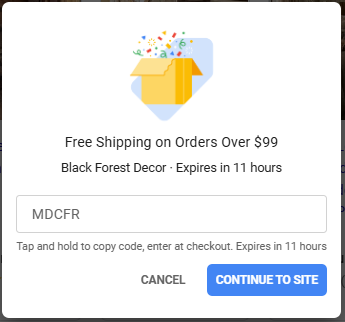
Free shipping can also be configured as a promotion, but with an important distinction. To qualify as a promotional annotation, free shipping must require a code or represent a temporary offer. Google discourages merchants from labeling everyday free shipping as a “promotion,” since the intent of promotional annotations is to highlight incremental, time-bound value.
If your business already offers standard free shipping, that should instead be configured within your shipping settings, which may trigger separate shipping-related annotations covered in the next section.
Free Gift
Free gift promotions allow you to indicate that a shopper will receive an additional item with their purchase. These offers can be:
- Automatically applied
- Triggered at a spend threshold
- Tied to a specific qualifying product
- Linked to another product in your catalog
This format is particularly effective for increasing average order value or adding perceived value without discounting your core product.
“Special Offer” Display
When active, promotions may appear on your Shopping ads or Free listings as a “Special offer” link. Clicking this opens a pop-up with full promotional details, reinforcing transparency and clarity before the shopper ever reaches your site.
As with all annotations, eligibility and display are not guaranteed. Promotions must comply with Google’s policy requirements and function as described at checkout.
Shipping Annotations
As consumer expectations have evolved, driven in large part by marketplaces like Amazon, free and fast shipping is no longer a differentiator in many verticals. It’s an expectation. While shipping annotations don’t always reflect a direct price reduction the way sale pricing or promotions do, they influence perceived total cost and delivery convenience, both of which materially impact click-through and conversion behavior.
In competitive Shopping results, shipping clarity can be the deciding factor between equally priced listings.
Free Shipping
The Free Shipping annotation appears when Google determines that the shipping cost to the shopper is $0. This is calculated based on your shipping settings configured in Google Merchant Center or the [shipping] attribute in your product feed.
If free shipping is conditional (e.g., free over $50), Google evaluates eligibility based on the product price and the configured threshold.
Estimated Delivery Date
In many cases, you’ll see annotations such as “Get by 2/23” or “Free delivery by Friday”.
These delivery-date annotations are generated based on your handling time and transit time settings. Even in the absence of other enhancements, visible delivery timing can significantly influence shopper behavior, particularly for time-sensitive purchases. For shoppers comparing similar products, earlier delivery can outweigh small price differences.
Fast & Free Shipping
The Fast & Free Shipping annotation highlights products that meet both speed and cost thresholds.
To qualify in the U.S., products must generally meet two conditions:
- Free: Delivered at no cost to the customer (or free once minimum order threshold is met)
- Fast: Delivered within 3 days or fewer
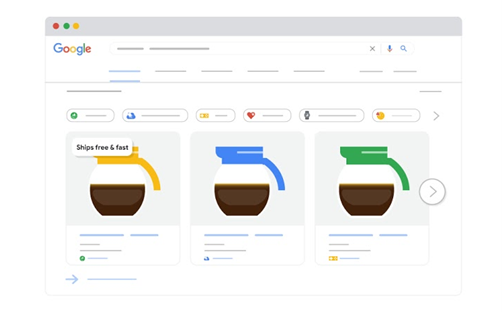
When eligible, this annotation may appear as “Ships free & fast”, “Free 2-day delivery”, or “Free 3-day delivery”. This is one of the most impactful shipping-related badges because it combines cost savings and speed, reinforcing both value and convenience in a single annotation.
Google verifies shipping accuracy by evaluating your site’s published shipping policies and your product landing pages. Consistent fulfillment performance is essential. Overpromising and underdelivering can jeopardize eligibility and diminish customer trust and satisfaction.
Seller Ratings & Product Reviews
If price signals communicate value and shipping signals reduce friction, ratings and reviews communicate trust.
In competitive Shopping results, shoppers are often comparing unfamiliar brands side by side. When products look similar and pricing is within range, social proof becomes the deciding factor. Star ratings and review counts provide immediate validation: signaling reliability, service quality, and product satisfaction before the shopper ever clicks.
Unlike discounts or shipping incentives, reviews cannot be manufactured or toggled on. They are earned signals, and when present, they can influence both click-through rate and conversion performance.
Seller Ratings
Seller ratings reflect your overall merchant experience, not a specific product. They aggregate feedback related to shipping reliability, customer service, returns, and overall purchase satisfaction. On Shopping ads and Free listings, they appear as a star rating and review count next to your merchant name, reinforcing credibility at the brand level.
Seller ratings are compiled from multiple sources and surfaced through Google Merchant Center. These sources can include:
- Google Customer Reviews
- Approved third-party review partners
- Reviews collected across Google-owned properties
Because seller ratings reflect merchant-wide experience, they influence how shoppers perceive your brand before evaluating any individual product.
Product Reviews
Where seller ratings validate the business, product reviews validate the item itself.
Product reviews are tied to individual SKUs and evaluate attributes such as quality, performance, fit, and overall satisfaction. They appear as star ratings and review counts directly on product cards within Shopping results.
Product-level ratings can be surfaced in Merchant Center through:
- Merchant-submitted product review feeds
- Structured review markup implemented on product pages
- Indexed third-party product review partners
When Google can confidently match your product to a broader catalog listing using a universal identifier, it may aggregate review data from across merchants selling the same item. If you’re unfamiliar with universal identifiers, you can refer to our article about product identifiers for an overview.
A 6-year-long case study conducted by Google revealed that having Product Ratings on the majority of eligible items leads to a 5% CTR improvement.
Bringing It All Together: The Power of Annotations
On Google Shopping, consumers make decisions in seconds, scanning listings and comparing multiple options at a glance. Annotations give shoppers the signals they need to make those choices confidently – highlighting value, convenience, and credibility.
When these signals are accurate, consistent, and visible, they help your listings stand out in competitive auctions, attract higher-intent traffic, and improve overall performance across both paid Shopping ads and Free listings. Optimizing annotations isn’t just a technical exercise — it’s a strategic way to turn structured feed data into visible advantages that influence shopper behavior and drive better engagement, clicks, and conversions over time.
If you have questions about improving your Google Shopping listings, contact us to talk with an expert!