TL;DR: Semantic search matches the meaning of a query rather than its exact words, so a search for “heart attack” can surface a page about “myocardial infarction.” Semantic search isn’t “LSI keywords” renamed, and good SEO fundamentals already cover most of it. If your traffic is down while rankings hold, compare Search Console metrics and revenue together, and treat rank tracker data as directional for now.
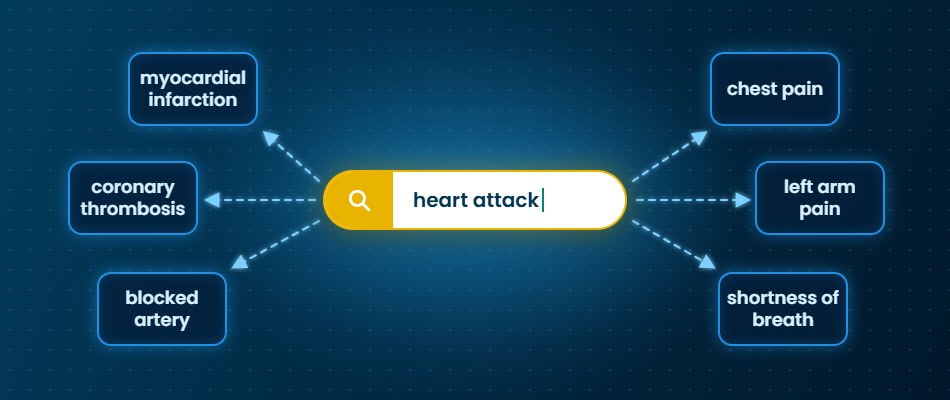
Semantic search matches on the meaning of a user’s query, not just on the words in the query. Instead of looking for pages that contain your exact phrase, it compares what a query means with what a page is about. With semantic search, a search for “heart attack,” for example, can surface a page that contains the phrase “myocardial infarction” but no instances of “heart attack.”
That’s the definition every guide gives you, and it’s probably not why you’re here. Maybe someone asked you whether you are doing “semantic SEO.” A vendor pitched you something with the word in it. Or your traffic dipped, and an AI explanation referenced semantic SEO.
Is This Just LSI Keywords with a New Name?
No, and the confusion is worth clearing up before you walk into any meeting. Google’s John Mueller has said repeatedly that there is no such thing as LSI keywords, and that anyone claiming otherwise is mistaken. Latent semantic indexing is a real information retrieval technique, but an old one, built to index small, known collections of documents.
What people usually mean by “LSI keywords” is related words, phrases, and entities. The instinct behind that framing is sound; it’s the label that’s the myth. AI search tools treat it as settled: in a small test we ran on the prompt “semantic search vs lsi keywords,” the queries the AI generated for itself included “SEO myth” and “not used by Google.”
The practical difference between the two ideas is this:
- LSI keyword advice treats meaning as a list of terms to sprinkle into a page.
- Semantic search compares what a query means with what a page is about. Sprinkling terms might help, but not much. What does make your site more likely to show in a semantic search is being clear about what the page covers, who it is for, and what question it answers.
How Does Semantic Search Work?
In short, the system turns text into numbers, then looks for numbers that sit close together.
Most systems convert both queries and passages into vector embeddings: lists of numbers that capture meaning. Passages about similar things end up numerically close, even when they share few words. That’s how a page that only says “myocardial infarction” can answer a search for “heart attack.”
When someone searches, the system converts the query into the same kind of number list and retrieves the nearest matches. That retrieval step is what vendors call “vector search.” Semantic search is the goal; vector search is one common way to get there.
Most systems don’t rely on meaning alone. Google’s own documentation describes hybrid search, which pairs semantic matching with keyword matching, as a popular pattern.
So, are you behind? Probably less than you fear. Doing fundamental SEO properly is already doing semantic SEO. If your pages answer real questions fully and you name your products and categories consistently, you have most of the foundation for success.
What Actually Changes with Semantic Search
The research on semantic search in AI is early, but we can start with studies that test what makes a page more visible in AI-generated answers. The Princeton paper that introduced the field of generative engine optimization tested nine content changes on a controlled benchmark. Three stood out: adding statistics, adding quotations from credible sources, and citing sources. They raised a page’s visibility in AI answers by roughly 30 to 40% on the paper’s main metric. Making text easier to read helped too, while stuffing in more keywords did little. Two caveats: the tests measured visibility inside AI answers, not website traffic or sales, and results varied by topic.
An e-commerce study by Columbia and MIT researchers tested 15 popular copywriting tips, such as adding an FAQ or sounding more authoritative, to see whether they helped products rank higher in an AI shopping assistant. For 10 of the 15, the effect was negligible or negative. The authors note that much of today’s advice on optimizing for AI answers rests on untested rules of thumb. In plain terms: add real specifics and be skeptical of anyone selling rewriting tricks.
When writing for AI, here is where we start:
- Lead with the answer. Open each section with the direct answer, then support it. This helps both a human reader skimming and an AI retrieval system pulling a passage.
- Name things the same way everywhere. Brand, product, and category terms should match across your pages, your markup, and your third-party listings. Inconsistency is a common reason AI tools describe brands inaccurately.
- Add specifics. Statistics with sources and visible dates give a page something concrete to be cited for. If your stats are original, that’s even better.
- Keep literal terms on the page. Search systems commonly combine literal matching with semantic matching, so use the words AI might search for. Exact product names, model numbers, and category terms still matter.
- Validate the schema you should already have. Check the Product markup on product pages, BreadcrumbList schema for site structure on category and product pages, and Organization markup that links your official profiles through the Schema.org sameAs property.
A note on FAQ schema. FAQ rich results stopped appearing in Google Search on May 7, 2026, although Google had already limited them to government and health sites in 2023. We do not have definitive research showing that FAQ markup lifts AI citations, but there’s no harm in adding it. Write FAQ content for its value to customers and contribution to page quality. Clearly written question and answer content is also easy for LLMs to cite.
None of this is a guarantee. Adding specifics has the most direct research behind it. The rest is sound practice that helps human readers and retrieval systems alike, even where AI-specific evidence is still thin.
When Traffic Is Down but Rankings Look the Same
This is the issue that sends most people to a search box, and it’s the one the standard guides skip. When we gave an AI chatbot a version of “why is my traffic down when rankings are consistent?” the queries it generated for itself (the query fan-out) went straight to Google Search Console documentation: clicks, impressions, CTR, and average position. That’s a good instinct, and a good place to start.
Pull those four numbers for the same periods, before and after the drop or year over year, and read them together:
- Impressions steady, clicks and CTR down, position unchanged. Your visibility held. People saw you and clicked less. That pattern fits answers appearing on the results page itself, including in AI Overviews.
- Impressions down. Something about visibility or demand changed. This needs a closer look at which pages and queries fell.
- Everything down together. Treat it as a possible ranking or technical issue until the page-level data says otherwise.
Then split the data. Branded and non-branded queries behave differently, and so do informational and transactional ones. Informational queries are where answers on the results page are most likely to absorb clicks.
Two cautions on Search Console itself. Average position blends every query, device, location, and AI Overview citation into one number, so use it for direction, not for evaluating one keyword on a single day. And the report caps how many queries it shows and hides low-volume ones, so a missing keyword does not prove a lost ranking.
We also covered the bigger picture of why sessions and influence can diverge in our post on why organic traffic is down but search isn’t. The short version: the click is becoming a lagging indicator, and your reporting needs a second lens.
How to Explain What’s Happening
Your boss wants one number, and sessions are down. The instinct is to explain with rankings. Right now, that is your weakest evidence (more on why below).
In your reporting, begin with these data:
- Search Console, side by side. Clicks, impressions, CTR, and average position for the same period.
- Organic revenue, revenue per organic session, and conversion rate. Session volume can fall while quality holds. Revenue per session alone can mislead, as the data below shows, so look at revenue and the ratio together.
- Two splits. Branded vs. non-branded, and informational vs. transactional. Informational and comparison queries are typically the ones AI answers absorb first, while transactional and branded searches tend to be more resilient.
Then match the pattern to a plain-language reading:
| What you see | Likely reading | What to say |
| Impressions steady, clicks and CTR down | Visibility held, fewer clicks | The results page changed, not our standing |
| Impressions down | Demand or visibility fell | We need a ranking and demand check |
| Sessions down, revenue steady or up | Fewer, higher-value visits | Quality held, volume shifted |
| Sessions down, revenue per session up, revenue down | Low-value traffic dropped out, but revenue still fell | Revenue per session looks better, but we lost revenue |
Here is what that distinction looks like across our own client base.
- Across 48 of our current ecommerce clients, organic search sessions to non-homepage pages fell more than 5% year over year on 31 accounts (Q3 2026 vs. Q3 2025).
- On 26 of those 31, revenue per organic session held or rose. The shoppers who still arrive from organic search are worth as much as they were a year ago, or more.
- Twelve of the 31 held or grew organic revenue outright, despite fewer sessions.
- The other 19 saw organic revenue fall, and that’s the gap we’re working to close through experimentation – a required strategy in the constantly changing world of AI search.
We’re not treating falling sessions as harmless. Fewer visits at the same value per visit still means less revenue. But the pattern tells us where the problem is. For most of these accounts, organic search is still sending the right shoppers. It’s sending fewer of them. That’s a reach problem, not a relevance problem, and reach is something you can act on.
For your own data, the question is the same one we’re asking for our clients: which pages and queries lost traffic? Were they informational queries that AI answers tend to absorb, or transactional ones that should have held? The answer tells you whether you’re seeing an expected shift or a fixable leak.
You can review our methodology below.
How to Update Your Reporting
Add one new line to your reporting. GA4 has a default “AI Assistant” channel for visits from chatbots like ChatGPT, Gemini, and Claude. Start there, and check whether it misses sources you care about. Treat the number as a floor – it does not include Google’s AI Overviews and AI Mode, which appear in Google Search Console instead. In addition, in October 2026 a bug briefly stopped ChatGPT links from passing a UTM tag, which pushed those visits into Direct. It was fixed within days, but it’s a reminder to keep an eye on your own traffic trends and check your Direct traffic before reading a drop as lost interest.
Be honest about what you cannot show. You cannot attribute all lost clicks to AI Overviews. Search Console’s Generative AI report shows how often you appear in AI Overviews and AI Mode, but only impressions, not clicks or queries. And the text-fragment method some teams used to spot AI Overview clicks was removed by Google in May 2026. Stick to language like “consistent with,” rather than “caused by.”
Before you walk in, have three sentences ready: what the data shows, what it cannot show, and what you will watch next. Something like: “Impressions held while clicks fell, which fits answers appearing on the results page. I can’t prove the cause, so I’m tracking revenue per session and AI referrals monthly.”
What Your Rank Tracker Can and Cannot Tell You Right Now
If your boss asks, “but where do we rank?” be careful. Google has spent several years making automated collection of its results harder, and since mid-September 2026, rank-tracking vendors have reported unusual data. Nozzle, which sells rank tracking, found that of 29.9 million results pages it checked since September 13, about 8.7% came back altered, up from 0.17% before. Search Engine Roundtable reported widespread tool problems, and several vendors have since posted fixes.
Two caveats. Nozzle has a stake in this, and Google has not confirmed (in anything we found) that it is deliberately feeding trackers altered results. Our earlier post on Google’s scraping defenses has the background.
What this means for your reporting:
- Report positions as ranges and trends, not single daily numbers.
- Treat a one-day collapse as a possible collection artifact. Check Search Console before telling anyone you lost a ranking.
- Treat a manual search as one observation, from one person, in one place, at one moment.
- Be careful with AI Overview presence from trackers. Tools can be served pages that differ from what people see, so AI presence tracking is affected too.
The tools are still useful for trends over time. They are just not the ground truth your boss may assume.
An Honest Note
Semantic search is not a new tactic you can buy; it’s a description of how search increasingly works. The work that matters most is the work good SEO already asked for: clear answers, consistent naming, and measurement you can defend.
The landscape is still moving. No one knows exactly how fast AI search will change discovery, how reliable rank data will be in six months, or which measurement methods will replace the ones that disappear. Anyone claiming certainty is oversimplifying.
What you can do now is walk into the next meeting knowing what your data shows, what it cannot show, and what you will watch next.
If you are not sure where your brand stands, talk to our SEO team.
Methodology: Figures cover 48 current ecommerce clients managed by ROI Revolution, comparing Q3 2026 (July 1 to September 30) with Q3 2025. “Organic” means organic search traffic in GA4’s default channel grouping. Branded search is approximated by, and excluded as, homepage-landing sessions; these figures describe organic sessions landing on non-homepage pages, a proxy rather than a query-level split. “Fell” means sessions declined more than 5%; “held” means a change of -2% or better. Revenue per session is GA4 purchase revenue divided by sessions. Six of 54 accounts were excluded: five with no comparable baseline, tracking changes, or implausible session jumps, and one affected by a site migration.
Sources
- Google Cloud Documentation, About hybrid search
- Search Engine Roundtable, Google: LSI Keywords Have No Effect Again & Again
- arXiv, GEO: Generative Engine Optimization
- arXiv, E-GEO: A Testbed for Generative Engine Optimization in E-Commerce
- Google Search Central, Deprecating the FAQ rich result feature
- Google Search Central Blog, Changes to HowTo and FAQ rich results
- ROI Revolution, The Battle over Google Scraping and Keyword Tracking Tools
- ROI Revolution, Why Organic Traffic is Down (But Search Isn’t)
- Search Engine Roundtable, OpenAI Drops UTM Parameters From ChatGPT Results (GPT-6)
- Nozzle, Poisoned Google SERPs
- Search Engine Roundtable, Third-Party Google Rank Tracking Struggling Now
- Advanced Web Ranking, Why Your Tracked Rankings No Longer Match What You See in Google
- Google Analytics Help, What’s New in Google Analytics