

In this edition: New Search Console Reports and Search Generative AI Controls.
Google Rolls Out New Performance Reports
Now you can see how people discover your content in Google’s Search Engine Results Pages (SERPs) on platforms other than your own website. In early July, Google announced it is adding platform reporting in Search Console (GSC) for X, Instagram, YouTube, and TikTok. And by the end of the month, the reports rolled out globally.
The new reports allow site owners to see the queries that lead to impressions and clicks to their social media and YouTube profiles, which posts are performing well, and spot trending content.
To set up your platform property in GSC, follow these steps:
- Go to the Search Console welcome screen to add a property or open the property selector dropdown in the sidebar and click Add property.
- Click Add next to the platform you want to add from the list of supported options and follow the prompts.
- Once ownership is verified, you’ll see a confirmation message. Click Go to property to complete setup. It will typically take a few days for data to appear in the reports.
Control Whether Your Website Shows in Generative AI Answers
Google is gradually providing access to its generative AI controls beyond the United Kingdom. If you check our Search Console account’s settings, you can see if these are available to you, yet. If not now, they should be in the near future. What does it mean?
The new generative AI controls allow you to tell Google whether you want your website shown in AI Mode, AI overviews, and other AI features on Google. They do not affect whether your website is shown in regular organic search rankings (the “10 blue links”).
According to the new documentation, here are your options:
- Include your sites links and content in Search generative AI features. This setting allows Google to use your website for grounding AI responses and to show links to your content.
- Exclude your website’s links and content from generative AI features. This setting prevents Google from using your site for grounding AI answers or linking to it.
- Inherit control from parent: If you have properties in GSC with parent/child relationships, this default setting allows the child property to follow the same settings as the parent. It can be overridden manually.
In all but rare cases, your ROI SEO team recommends allowing Google to cite your website and use it for grounding AI answers. Recent studies suggest that being cited by Google at the top of the page in AI Overviews increases your chance of gaining a click to your website and may lead to additional direct traffic later.
Allowing Google to ground its answers about your business with information from your own website is also a great way to help own your narrative.
Cloudflare Offers Options to Manage AI Bot Traffic
On September 15, 2026, Cloudflare will be setting new defaults for controlling AI bot traffic. These settings concern search bots that can scan your website to help it appear in search engine results, training bots that scrape content to train AI models, and Agent bots that pull information from your website to provide responses to user questions. The new defaults are:
- Search – allowed by default
- Training – blocked by default on pages that display ads
- Agent – blocked by default on pages that display ads
- Multi-purpose (search + training) – blocked by default
Site owners who are new to Cloudflare on or after September 15th will not have to make any changes if they are happy with these settings. Existing customers of Cloudflare will need to mark their security settings to confirm their preferences.
In response to this announcement, Google spokesperson John Mueller reminded Reddit users that Google does not use llms.txt or llms-author.txt files, which apparently means Google has no plans to follow Cloudflare’s content signals.
Generative AI Reports Are Becoming Widely Available
Last month, we reported that Google was rolling out Search Generative AI Performance report in Search Console, starting with a small set of websites for testing. It is now gradually becoming more widely available. To see if you have access to the report, look at the left-hand menu under “Search results.” If you see a drop-down arrow, click it to see the new report.
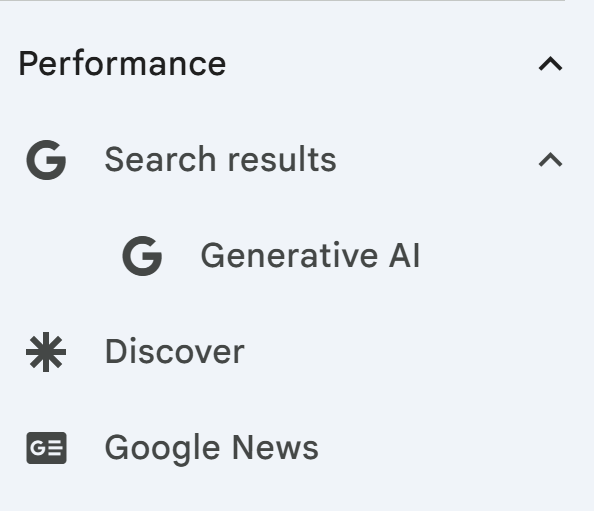
If you don’t see it yet, you likely will soon.
ICYMI: Recent SEO Blog Posts
June 2026 SEO & GEO News Recap
AI-Powered Shopping: How to Leverage Google’s New Conversational Attributes & AI Insights